
Running a small business in 2026 means you’re competing against companies with bigger teams, bigger budgets, and dedicated departments for every function you handle yourself. But here’s the thing: the gap between small businesses and larger operations has never been smaller, because the tools available to you have never been better.
The right technology stack can give you back hours every week, reduce costly errors, and let you run a leaner, more profitable operation without burning out. This guide breaks down the AI and operational tools worth your attention right now.
AI Tools That Do the Heavy Lifting
1. ChatGPT or Claude — AI Assistants for Writing and Research
Writing every email, proposal, and social caption from scratch takes significant time every week. AI writing assistants like ChatGPT (OpenAI) and Claude (Anthropic) handle the first draft so you can focus on refining and personalizing.
Small business owners use them for drafting client proposals and follow-up emails, writing social media content and blog posts, summarizing long documents, answering operational questions, and brainstorming marketing and pricing strategies. Neither replaces your judgment, but both cut the time it takes to produce professional-quality writing by 60–70%. Start by using one for your next five client emails and measure the time saved.
2. Gamma — Professional Presentations and Docs in Minutes
Creating a polished pitch deck, proposal, or one-pager can mean hours in PowerPoint or the cost of hiring a designer. Gamma offers a faster path. Type a prompt describing what you need, and Gamma generates a fully formatted, visually professional presentation or document in seconds. You can edit, rearrange, and brand it from there, with the structural heavy lifting already handled.
For business owners who regularly put together client proposals, sales decks, or internal reports, Gamma cuts production time dramatically. The output looks designed and polished, which matters when you’re trying to make a strong first impression. Use it for client proposals, pitch decks, service overviews, onboarding documents, and team presentations.
3. Notion AI — Your Business Brain in One Place
Notion is a flexible workspace for notes, wikis, databases, and project management. Its built-in AI assistant summarizes meeting notes, drafts SOPs, generates project outlines, and answers questions based on your existing documents. For business owners looking to improve knowledge management, Notion AI turns scattered notes into structured, searchable systems.
It’s particularly valuable as you grow. When you bring on employees or contractors, a well-organized workspace gets them up to speed without relying on you for every answer.
4. Otter.ai — Automatic Meeting Notes
Typing up notes after client calls takes time that adds up fast. Otter.ai records and transcribes your meetings in real time, then summarizes key points and action items automatically. Connect it to Zoom or Google Meet and every call becomes a searchable, documented record. No more relying on memory, no more “can you send me a recap?” emails.
5. Zapier — Connect Everything Without Coding
Zapier automates workflows between apps that don’t natively integrate. When a new client fills out your intake form, Zapier can automatically create a contact in your CRM, send a welcome email, and add a task to your project management tool, without you touching anything. If you find yourself copying data from one app to another, there’s likely a Zapier workflow that handles it automatically.
Operational Tools That Keep Your Business Running Smoothly
1. Finli — Payment Processing and Business Management Built for Small Businesses
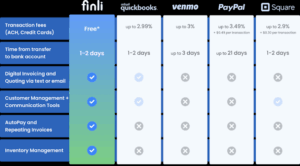
Many small business owners piece together separate tools for invoicing, payment processing, customer tracking, and follow-up. That fragmentation costs time, creates gaps where payments slip through, and makes your finances harder to understand at a glance. Finli consolidates all of it into one platform at $39/month.
Digital invoices go out with a one-click “Pay Now” button so customers can pay immediately, and Finli offers 0% ACH fees so you keep more of every payment you collect. Once you send an invoice, Finli’s automated reminder system follows up at issue date, due date, two days past due, and five days past due via email or SMS. The system handles collection follow-up automatically, so no invoice slips through the cracks while you’re focused on running your business.
For customers on retainers or regular schedules, Finli’s recurring invoice and Autopay features process payments automatically. Set it up once and your predictable revenue actually becomes predictable. The dashboard shows you exactly which invoices are outstanding, which customers are overdue, and where your cash stands at any moment. Every customer you invoice automatically gets a profile tracking their payment history, communication preferences, and notes, and everything syncs directly to QuickBooks with no double entry required.
For small business owners who want to stop chasing payments and start managing cash flow with real visibility, Finli is the operational foundation everything else builds on.
2. Gusto — Payroll and HR Without the Headaches
Payroll mistakes are expensive, both financially and legally. Gusto handles payroll processing, tax filing, benefits administration, and onboarding documents automatically. It’s particularly useful for businesses that mix full-time employees and 1099 contractors. Gusto files the right tax forms for each worker type and keeps you compliant without requiring you to track changing tax rules yourself.
3. Calendly — End the Scheduling Back-and-Forth
Scheduling a single meeting can involve five or six emails. Calendly eliminates that entirely. Share your link, clients pick a time that works for them, and it lands on both calendars automatically. You set your availability rules, buffer times between meetings, and meeting types. Clients see a clean booking page, and the logistics take care of themselves.
4. Google Workspace — Professional Infrastructure at Low Cost
Google Workspace gives you a professional email address, shared Drive, Docs, Sheets, and Meet, all integrated and accessible from any device. Documents live in shared drives instead of inboxes. Team collaboration happens in real time. And you project a polished, professional image from the very first client email.
5. Slack — Keep Team Communication Organized
Internal team communication can get buried in email threads that are slow to navigate and hard to search. Slack organizes conversations into channels by topic, project, or team. Quick questions get quick answers, decisions are documented, and your inbox stays reserved for client communication that belongs there.
How to Think About Your Tool Stack
You don’t need all of these immediately. The goal is to add tools that solve your most pressing problems first.
Start by identifying where your time actually goes. If invoicing and payment collection are draining hours every week, Finli should be your first move. If team communication is getting disorganized, start with Slack. If producing written content is taking too long, an AI writing assistant pays for itself almost immediately.
The businesses that run most efficiently aren’t the ones with the most tools. They’re the ones who’ve matched the right tools to their real problems and use them consistently.
Your time is your most valuable resource. Invest it in the parts of your business that only you can do. Let the tools handle the rest.
Ready to get paid faster and cut the administrative work eating your week? Learn more at finli.com or reach out at support@finli.com.