
You’re quoting a project. You create an estimate in Excel, calculate the hours and materials, share it with the client. They approve it. Now you need to create the invoice. You manually re-enter all the same information. Client name. Project description. Line items. Pricing. Due date. Payment terms. You’re typing the same details you just entered in the estimate. Hours wasted. Multiple opportunities for errors. And you still haven’t collected payment.
This workflow is common for small service businesses. Most use a patchwork of tools: Excel for estimates, manual invoices, email follow-ups, spreadsheets to track what’s been paid. Each step requires manual data entry. Each hand-off is a place information can get lost or mismatched.
The better approach is simpler. Use a single document that functions as both estimate and invoice. When a client approves the estimate, convert it to an invoice instantly. No re-entry. No version conflicts. No starting from scratch. The information flows directly from proposal through payment collection in one seamless process.
Why Most Small Businesses Create Estimates and Invoices Separately
The separation exists because traditional tools weren’t designed to bridge the gap. Excel spreadsheets work fine for creating an estimate. You enter client information, project scope, pricing. But Excel doesn’t have built-in invoicing features. So you export the estimate, create a separate invoice document, and manually type in the details again.
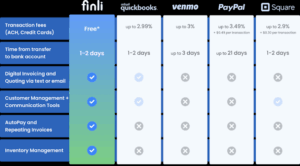
QuickBooks and similar accounting software offer invoicing, but the user interface requires manually recreating estimates as invoices. Some free tools like Wave let you create estimates, but they don’t integrate with invoicing or payment collection. You end up with a disconnected workflow where information lives in multiple places.
The result is predictable. Time wasted re-entering data. Inconsistencies between the estimate the client approved and the invoice they’re being asked to pay. Confusion about which version is current. Projects that stall because estimates take too long to convert to invoices. Payment delays because invoicing is manual and slow.
The Cost of Separate Estimate and Invoice Documents
Let’s be specific about what this workflow actually costs you. If you send estimates frequently and create invoices manually, you’re losing hours every month to data entry.
Time cost: Creating an estimate takes 30 minutes (gathering information, entering details, calculating pricing). Creating the corresponding invoice takes another 30 minutes (re-entering the same information, recreating line items, confirming pricing). On 20 projects monthly, that’s 20 hours per month spent re-entering information you’ve already entered. At $50 hourly, that’s $1,000 per month. $12,000 annually.
Error cost: Manual re-entry creates mistakes. A line item amount gets typed wrong. A client name is misspelled. The project scope in the invoice doesn’t match what was approved in the estimate. These inconsistencies create confusion, trigger follow-up conversations, and delay payment collection.
Conversion cost: Clients who approve estimates don’t always convert to paying invoices at the same rate. Some abandon the process because the invoice looks different from the estimate. Others get delayed or confused. Conversion friction directly impacts revenue.
How Estimate-to-Invoice Conversion Works
The ideal workflow is simple. Create an estimate once. When the client approves it, convert it to an invoice with a single action. All information transfers automatically. No manual re-entry. No version conflicts. The approved pricing becomes the invoice pricing. The agreed scope becomes the invoice line items. The client sees a professional, consistent document that matches what they approved.
This approach requires a platform built to handle both estimates and invoicing. You create the estimate with all necessary details: client information, service descriptions, line item pricing, tax calculations, payment terms. The client reviews it and approves. Then, instead of starting from scratch, you convert the estimate to an invoice. The system automatically adjusts dates and payment terms but preserves all the details the client already approved.
The workflow accelerates payment collection because speed increases from proposal to invoice. Without the conversion step, days or weeks pass while you manually recreate the estimate as an invoice. During that time, the client’s approval enthusiasm fades. Details slip their mind. Payment gets delayed. With instant conversion, the invoice arrives while approval is fresh. Payment follows faster.
The Accuracy Advantage
Data entry errors are common when you’re manually typing information multiple times. If your estimate says the project includes 40 hours at $100 hourly, and your invoice says 40 hours at $105 hourly, the client notices. They question the discrepancy. They delay payment while the issue gets resolved. The error creates friction.
Automatic conversion eliminates this problem entirely. The pricing the client approved becomes the invoice pricing. Exactly. No rounding differences, no transcription errors, no version mismatches. The invoice matches the estimate perfectly because they’re the same document.
This accuracy matters especially for complex projects with multiple line items, varying rates, and tax implications. Manual re-entry creates compounding error opportunities. Automated conversion eliminates all of them.
Why Some Businesses Still Use Separate Documents
Many small business owners defaulted to separate workflows because that’s how traditional tools worked. You used Excel for estimates because it was free and flexible. You used QuickBooks for invoicing because that’s where accounting data lives. They didn’t talk to each other, so estimates and invoices remained separate.
Cost considerations also played a role. Premium invoicing software costs money. Free tools had limited functionality. The gap between them meant most small businesses cobbled together solutions instead of finding an integrated platform.
The inertia is powerful too. If you’ve been creating separate estimates and invoices for years, changing feels risky. You’re comfortable with the current workflow despite its inefficiency. Switching systems feels like it will disrupt operations. The switching cost feels higher than the cost of inefficiency.
Takeaways
Estimate to invoice conversion is a fundamental workflow improvement. When you use a single document that functions as both estimate and proposal, you eliminate hours of manual data entry, reduce errors, and accelerate payment collection.
The businesses that move faster than competitors aren’t working harder. They’re using better systems. Estimate conversion is one of those system improvements that compounds over time. Five hours saved per month on data entry is 60 hours annually. That’s time you spend on client relationships, revenue generation, and business growth instead of paperwork.
This week, look at your current estimate and invoicing workflow. How much time do you spend re-entering information between estimate and invoice? How many errors have resulted from inconsistencies between the two documents? Then consider whether a platform that handles both in one place would actually save you time and improve accuracy.
Get started at finli.com or reach out to support@finli.com if you have questions.