
Getting your finances organized before the new year isn’t just about reducing stress. It directly impacts your bottom line. Businesses with organized financial systems spend 40% less time on bookkeeping and are significantly more likely to catch costly errors before they compound. The work you do now sets the foundation for smarter decisions, easier tax filing, and clearer cash flow visibility throughout 2026.
The good news? You don’t need an accounting degree or expensive consultants to get your finances in order. A few focused hours over the next few weeks can transform financial chaos into a system that actually works for your business.
Start With a Complete Accounts Receivable Audit
Before organizing anything else, you need to know exactly who owes you money. Outstanding invoices represent cash that belongs to your business but hasn’t arrived yet. The longer they sit unpaid, the less likely you’ll collect the full amount.
Pull every outstanding invoice and sort them by age. Invoices under 30 days are still within normal payment windows. Invoices between 30-60 days need immediate follow-up. Anything over 60 days requires a direct conversation or escalated collection approach.
This audit often reveals surprises. Maybe a reliable customer has an invoice stuck in their approval queue. Perhaps a payment failed and neither party noticed. Sometimes invoices simply got lost in email chaos. Whatever the cause, December is your last chance to collect 2025 revenue before it becomes a 2026 problem.
Contact every customer with outstanding balances over 30 days this week. A simple, professional message often resolves what standard follow-ups hadn’t yet addressed. Many businesses recover 15-25% of their aged receivables just by making direct contact before year-end.
Reconcile Your Bank Accounts
Your bank statements tell the truth about your business finances, but only if you actually compare them to your records. Bank reconciliation catches duplicate charges, missed deposits, unauthorized transactions, and accounting errors that accumulate over time.
Start with your most recent statement and work backward through the year. For each month, confirm that your recorded deposits match what actually hit your account, your recorded expenses match what actually left your account, and any discrepancies have clear explanations.
Pay special attention to recurring charges. Subscription services you forgot about, software licenses for tools you stopped using, and price increases you never approved can drain hundreds of dollars monthly. One business owner discovered $340 in monthly subscriptions for services she’d cancelled. The cancellations never processed, and she’d been paying for eight months without realizing it.
If you haven’t reconciled in months, this process might take a few hours. But completing it now means you enter 2026 with accurate numbers and a clear picture of where your money actually goes.
Separate Business and Personal Finances Completely
If you’re still mixing personal and business transactions, fix this before year-end. Commingled finances create accounting nightmares, complicate tax preparation, and weaken the legal protections that separate your business from your personal assets.
Open a dedicated business checking account if you don’t have one. Move all business income and expenses to this account. Set up a system for paying yourself, whether that’s a regular owner’s draw or formal payroll, instead of randomly transferring money when you need it.
This separation makes everything easier. Your bookkeeper or accountant won’t need to sort through personal grocery runs to find business expenses. Your tax preparation becomes straightforward. And if you ever need business financing, lenders will see clean financial records that demonstrate professional operations.
Organize Your Expense Documentation
Tax deductions require proof. Every business expense you want to deduct needs documentation: receipts, invoices, contracts, or bank statements that verify the purchase.
Create a simple system for organizing 2025 expenses by category. Common categories include office supplies and equipment, software and subscriptions, professional services (legal, accounting, consulting), marketing and advertising, travel and meals, vehicle expenses, insurance, and rent or utilities.
Digital storage works best for most businesses. Scan paper receipts and save them with clear naming conventions that include the date, vendor, and amount. A receipt from Office Depot on March 15 for $127.43 becomes “2025-03-15_OfficeDepot_127.43.pdf.” This naming approach makes finding specific expenses during tax preparation dramatically faster.
Don’t forget to document expenses paid through credit cards or digital payment platforms. Download annual statements from every payment method you’ve used for business purchases. These serve as backup documentation if individual receipts go missing.
Review Your Pricing and Profitability
Year-end is the perfect time to evaluate whether your pricing actually supports your business goals. Many small business owners set prices once and never revisit them, even as costs increase and market conditions change.
Calculate your true profit margin on your main products or services. Include everything: direct costs, overhead allocation, payment processing fees, and the time you spend delivering the work. You might discover that your most popular offering barely breaks even once you account for all costs, while a less popular service generates substantially better margins.
This analysis often reveals pricing adjustments that should happen in January. A 5-10% price increase on underpriced services, implemented at the start of the new year, feels natural to customers and can significantly improve your profitability without requiring you to work more hours.
Set Up Systems That Maintain Organization Automatically
The real goal isn’t just organizing your 2025 finances. It’s building systems that keep 2026 organized without constant effort. Manual processes break down when you get busy. Automated systems work whether you’re paying attention or not.
Start with your invoicing and payment collection. If you’re still creating invoices manually, tracking payments in spreadsheets, and sending reminder emails one at a time, you’re spending hours on work that should happen automatically.
How Finli Keeps Your Finances Organized Year-Round
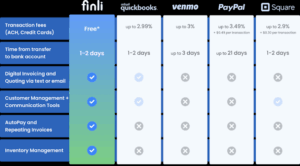
Finli’s digital back office platform eliminates the manual work that makes financial organization so difficult to maintain. Instead of cobbling together separate tools for invoicing, payment tracking, and customer management, everything lives in one system that keeps your finances organized automatically.
Real-time payment visibility shows you exactly which invoices are outstanding and who’s paid at any moment. No more digging through emails or checking multiple bank accounts to understand your cash position. When a customer pays, you know immediately, and the payment automatically matches to the correct invoice.
Automated payment reminders handle the follow-up that most business owners forget or avoid. Finli sends professional reminders at the right intervals: when invoices are issued, when they’re due, and when they become overdue. Your customers stay informed, and you don’t spend time chasing payments that could collect themselves.
Built-in customer records track every invoice, payment, and interaction with each client. When tax season arrives or you need to review a customer’s history, everything is already organized and searchable. No more reconstructing payment histories from scattered emails and bank statements.
QuickBooks integration syncs your Finli data directly to your accounting software. Customers, invoices, and payments flow automatically into QuickBooks without double entry. Your books stay current, and reconciliation becomes a quick verification rather than an hours-long project.
Every feature (invoicing, payment processing, CRM, automated reminders) comes included at $39/month with 0% ACH fees. The platform pays for itself quickly through reduced administrative time and faster payment collection.
Create Your Year-End Financial Checklist
With a few weeks left in 2025, focus your energy on the tasks that matter most.
This week: Complete your accounts receivable audit and contact customers with overdue invoices. The sooner you reach out, the better your chances of collecting before year-end.
Next week: Reconcile your bank accounts for the entire year. Flag any discrepancies, cancel unused subscriptions, and document any transactions that need explanation.
Before December 31: Organize all expense documentation by category. Ensure you have receipts or verification for every deduction you plan to claim. Download annual statements from all payment platforms and credit cards.
First week of January: Review your pricing against your actual costs and profitability. Implement any necessary adjustments while the new year transition makes changes feel natural to customers.
Takeaways
Financial organization isn’t a one-time project. It’s an ongoing system that either works for you or against you. The businesses that enter each new year with clean books, clear cash flow visibility, and automated processes spend less time on administration and more time on growth.
Start with the highest-impact tasks: collecting outstanding receivables and reconciling your accounts. These actions often recover money and catch errors that directly improve your bottom line.
Then build systems that maintain organization without requiring constant attention. Automated invoicing, integrated payment tracking, and proper accounting connections transform financial management from a recurring headache into a background process that just works.
The work you do now determines whether 2026 starts with clarity and control or with the same financial chaos you’re trying to escape. A few focused hours this month can make all the difference.