
Counting stock by hand. Updating spreadsheets at midnight. Discovering you’re out of your best-selling product right when a customer wants to buy it. If any of this sounds familiar, you’re not alone. For small business owners juggling a dozen responsibilities, inventory management often falls to the bottom of the priority list until it causes a real problem.
The good news? Automated inventory management removes the guesswork and manual tracking that drain your time and cost you sales. This guide breaks down how automation works, what it can do for your business, and how to get started without overhauling your entire operation.
The Real Cost of Manual Inventory Tracking
Most small businesses start with simple methods: a notebook, a basic spreadsheet, or mental notes about what’s selling and what’s sitting on the shelf. These approaches work until they don’t.
Bad inventory management hits small businesses hard. Every product sitting unsold on your shelf is cash you can’t use elsewhere. Every time a customer wants something you don’t have in stock, that’s a sale walking out the door. Over the course of a year, these small losses add up to real money.
Manual tracking creates three specific problems that hurt your bottom line:
- Stockouts: Running out of popular items means lost sales and disappointed customers. When faced with a stockout, 21-43% of shoppers will switch to another brand.
- Overstocking: Tying up cash in products that sit unsold strains your working capital. That money could fund marketing, payroll, or growth opportunities.
- Time drain: Hours spent counting, reconciling, and updating inventory records are hours not spent serving customers or growing your business.
(Source: Harvard Business Review)
What Automated Inventory Management Actually Does
Automated inventory management uses software to track stock levels, monitor sales patterns, and alert you when action is needed. Instead of manually updating quantities after each sale, the system does it automatically. Instead of guessing when to reorder, you get notifications based on actual data.
Here’s what happens behind the scenes:
Real-Time Stock Updates
Every time you make a sale, your inventory count adjusts immediately. No end-of-day reconciliation. No wondering whether your spreadsheet reflects reality. The numbers you see are the numbers you have.
Low Stock Alerts
Set minimum thresholds for each product, and the system notifies you when stock drops below that level. You decide what “low” means for your business, whether that’s 10 units or 100, and you’ll know before you hit zero.
Sales Pattern Visibility
Automated systems track what sells, when it sells, and how fast. This data helps you spot seasonal trends, identify your best performers, and make smarter purchasing decisions.
Benefits That Hit Your Bottom Line
Automation isn’t about replacing human judgment. It’s about giving you better information to make decisions. The practical benefits show up in several ways:
| Benefit | Impact on Your Business |
| Fewer Stockouts | Capture sales you’d otherwise miss. Customers find what they need and come back. |
| Reduced Overstock | Free up cash tied in slow-moving inventory. Order what you need, not what you think you need. |
| Time Savings | Eliminate hours of manual counting and spreadsheet updates each week. |
| Better Forecasting | Use actual sales data to predict future needs instead of relying on gut feelings. |
| Improved Cash Flow | Right-size your inventory investment. Keep enough to meet demand without excess. |
43% of small businesses either don’t track inventory or use manual methods. Those who switch to automated systems report an average of 25% reduction in inventory costs and a 30% decrease in time spent on inventory management.
(Source: Wasp Barcode Technologies)
Getting Started Without the Headache
Implementing inventory automation doesn’t require a complete system overhaul or weeks of setup. The key is choosing a solution that fits your existing workflow rather than forcing you to change everything.
Start With Your Current Products
Begin by entering your existing inventory into the system. This initial setup takes time, but you only do it once. From there, the system maintains itself as you add new products and make sales.
Set Meaningful Reorder Points
For each product, determine the minimum quantity you want on hand before reordering. Consider your supplier lead times. If it takes two weeks to receive new stock, your reorder point needs to account for sales during that window.
Connect to Your Sales Channels
The real power of automation comes when your inventory system talks to your sales tools. When invoicing and inventory live in the same platform, every transaction automatically updates your stock levels.
How Finli Handles Inventory for Small Businesses
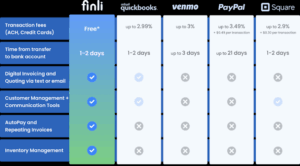
Finli’s inventory management is built into the same platform you use for invoicing and payments. This integration matters because it eliminates the disconnect between selling and tracking.
When you create an invoice in Finli, you can pull products directly from your inventory. The system automatically adjusts quantities when payments complete. No separate data entry. No reconciliation between systems.
Key inventory features in Finli include:
- Product catalog management: Store products with descriptions, pricing, and current quantities in one place.
- Low stock notifications: Get alerts when products drop below your set thresholds.
- Invoice integration: Add products to invoices with a few clicks. Quantities update automatically.
- QuickBooks sync: Keep your accounting software current without manual updates.
Because Finli handles invoicing, payments, and inventory together, you get a complete picture of your business operations. See which products generate the most revenue, identify slow movers, and make purchasing decisions based on actual customer behavior.
Take Control of Your Inventory Today
Manual inventory management is a time sink that creates unnecessary risk. Every hour you spend counting stock or updating spreadsheets is an hour you could invest in growing your business. Every stockout costs you a sale and possibly a customer.
Automated inventory management isn’t complicated or expensive. With the right tools, you can set up a system that tracks stock in real time, alerts you before problems happen, and gives you data to make smarter decisions.
Finli’s inventory features come included with your subscription at $39/month, alongside invoicing, payment processing with 0% ACH fees, and CRM tools. Everything works together, so you spend less time on administration and more time running your business.
Ready to stop guessing and start knowing exactly what’s in stock? Get started at finli.com or reach out to our team at support@finli.com.